
Bus Simulator Indonesia puts you in the driver’s seat of a long-distance bus on busy Indonesian roads, and it does it so well that the game has crossed 100 million downloads on the Play Store. Fans simply call it BUSSID. If you have watched those bus driving reels with loud musical horns, colourful bus designs and long convoys on highways, there is a good chance the clip came from this game.
This guide is for anyone who wants to start playing the right way. You will learn what the game offers, how to finish your first trip without crashing, the driving habits that save time and money, how liveries and convoys work, and where to download it safely. The official download button is at the end of the post.
What Makes Bus Simulator Indonesia Different?
There are many bus games on the Play Store, but most of them feel the same after ten minutes. Bus Simulator Indonesia stands out because it is built around real Indonesian roads, real-style Indonesian buses and the culture that surrounds them. The developer itself says the goal was to let players feel what it is like to be a bus driver in Indonesia, in a fun and authentic way.
Roads that feel like real places
The maps are based on Indonesian cities and highways, with toll roads, narrow town streets, hill sections and bus terminals. Players often say the scenery looks close to real tourist spots, and that local touch is a big reason the game has stayed popular for so many years.
Simple controls, deep gameplay
You can start driving within a minute, even if you have never played a simulator before. But under the simple controls there is a lot to learn: fuel, passenger stops, traffic, indicators, braking distance and route planning. That mix keeps both new players and long-time fans busy.
Features listed by the developer
- Design your own livery for any bus
- Easy and intuitive controls
- Authentic Indonesian cities and places
- Indonesian-style buses
- Fun musical horns, including the famous telolet sound
- Detailed 3D graphics
- No disturbing ads while you are driving, as per the developer
- Leaderboard and online save of your progress
- Vehicle mod system to use your own 3D bus models
- Online multiplayer convoy with other players
The Story Behind the Famous Telolet Horn
You cannot talk about Bus Simulator Indonesia without talking about the horn. In Indonesia, many intercity buses are fitted with special musical horns that play a quick tune instead of a plain honk. Kids stand by the roadside and shout “Om Telolet Om”, which roughly means “Uncle, play your horn, uncle!”, and they cheer when the driver plays it.
In December 2016, videos of this went viral around the world, and even big international DJs started posting about it. You can read the full background on the Om Telolet Om page on Wikipedia. The game arrived in 2017, right after this trend, and the telolet horn became one of its most loved features. Today, many players spend as much time choosing horn sounds as they do driving.
Your First Trip in Bus Simulator Indonesia
The first trip decides whether you enjoy the game or uninstall it. Follow this order and your first ride will feel smooth. Menu names can change a little between updates, but the flow stays the same.
- Install from the Play Store and open the game on a stable internet connection, because the first launch downloads extra map data.
- Check the settings first. Pick a control style you are comfortable with, such as steering wheel, tilt or buttons. Lower the graphics if your phone is mid-range.
- Choose your starting bus from the garage. The free starter bus is good enough to learn on.
- Pick a short route for your first trip. Long highway routes are fun, but a short city route helps you learn braking and turning without pressure.
- Drive slowly and stop at every terminal on the route so passengers can get in and out.
- Finish the trip and collect your earnings. That money is what you use later for new buses and upgrades.
Do not rush to unlock expensive buses on day one. Spend your first few trips just learning how the bus behaves on turns, slopes and wet roads. That practice pays off later on longer routes.
9 Essential Tips for a Smooth Drive
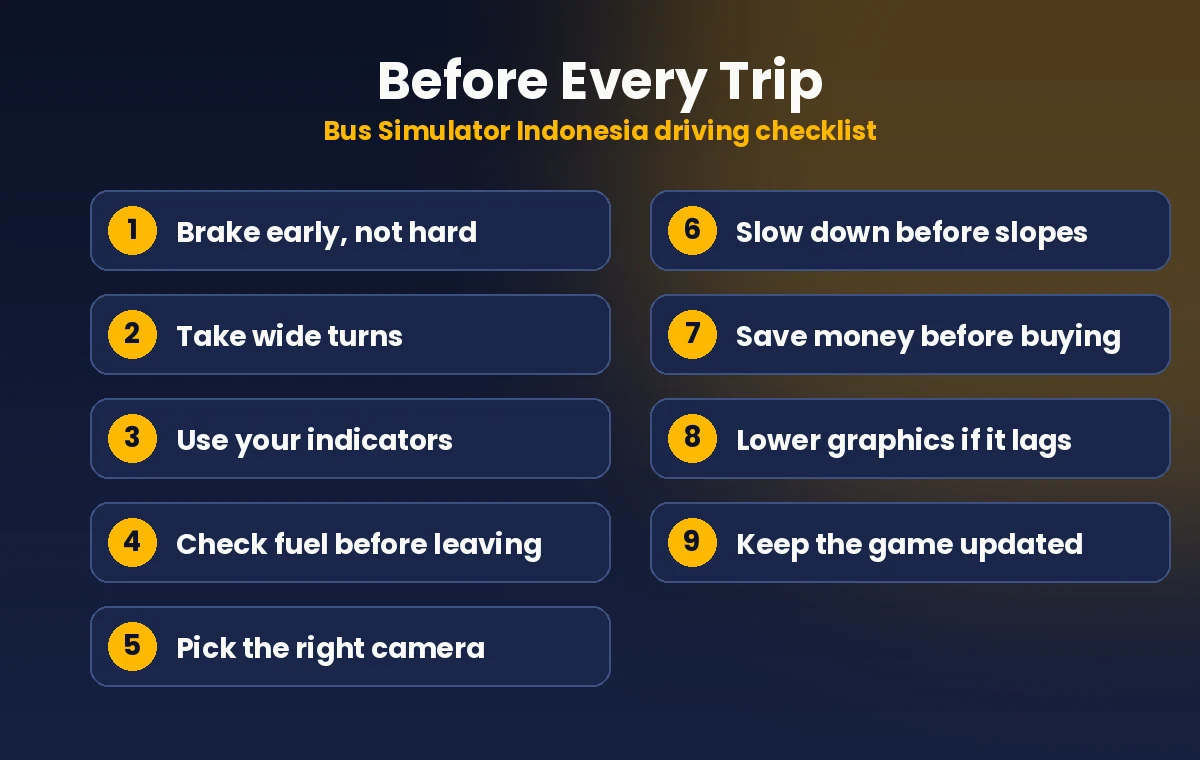
These are the habits that separate a calm, profitable driver from someone who keeps crashing into barriers. Most of them come straight from how a real bus behaves, which is exactly what makes Bus Simulator Indonesia feel realistic.
1. Brake early, not hard
A loaded bus is heavy, so it needs more distance to stop. Start slowing down well before a turn, a toll gate or a terminal. Hard braking at the last second is the most common reason new players miss their stop or hit the car in front.
2. Take wide turns
A bus is long, and its back wheels follow a tighter path than the front. Move slightly outward before you turn, then steer in slowly. This one habit saves a lot of scratched paint and angry traffic.
3. Use your indicators
Turning on the indicator before changing lanes or turning makes the drive feel real, and it helps other players in convoy mode understand where you are going.
4. Keep an eye on fuel
Long routes can drain your tank faster than you expect. Check the fuel level before you leave the terminal, and refill at a fuel station on the way if it starts running low. Running out in the middle of a highway wastes a lot of time.
5. Choose the right camera
The inside cabin view looks the most realistic, while the outside view behind the bus makes parking and tight turns easier. Many players switch between the two depending on the road. Try both and see what feels natural to you.
6. Respect the speed on slopes
Hill roads are where most crashes happen. Slow down before going downhill, not after you are already speeding. A controlled descent is safer than trying to brake halfway down.
7. Save money before buying a new bus
It is tempting to spend every coin on the first nice-looking bus. Instead, complete a few longer trips and build up savings. That way you can buy a bus you really want instead of settling for something in between.
8. Lower graphics for smoother play
If the game stutters or your phone gets warm, bring the graphics quality down a step. A smooth game at medium settings is far more enjoyable than a laggy game at high settings, and it is easier on your battery too.
9. Keep the game updated
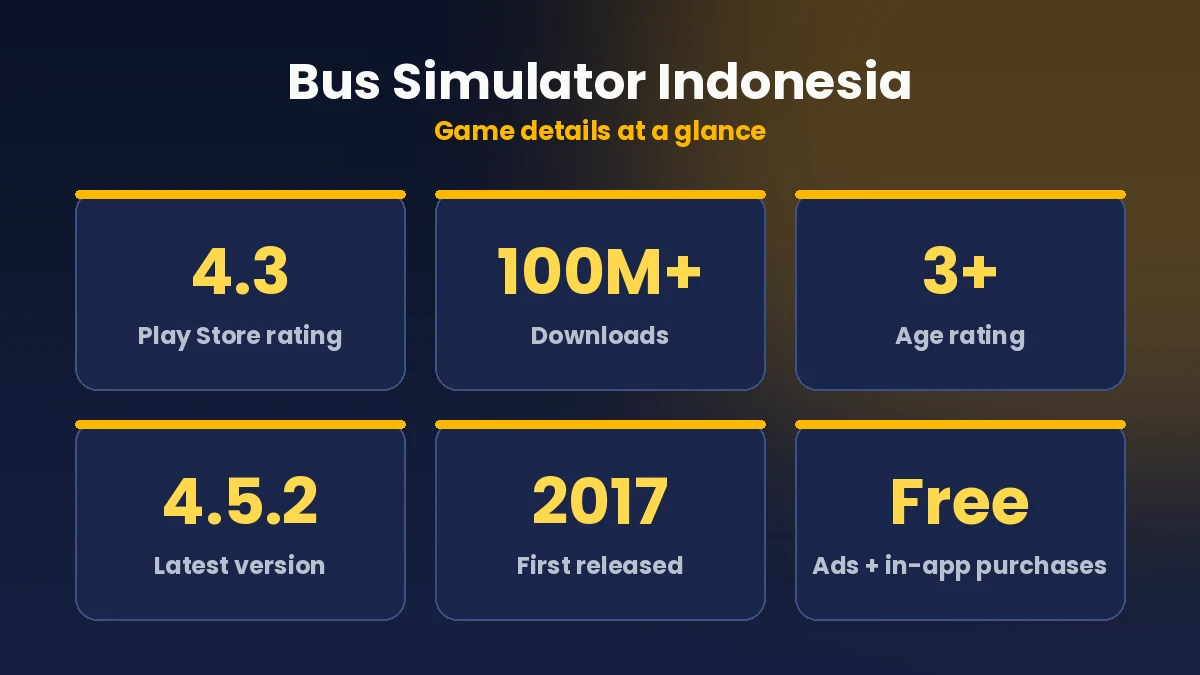
Maleo updates the game regularly. The latest version, 4.5.2, added the driver’s hands on the steering wheel along with bug fixes. Updating from the Play Store also keeps you compatible with other players in convoy mode.
Drive like you have real passengers on board. Slow, steady and on time always beats fast and scratched.
Design Your Own Bus Livery
A livery is the paint design on the outside of your bus. This is where Bus Simulator Indonesia becomes more than a driving game. You can apply a custom design to your bus and make it look like a real travels company bus, a festival special or something completely your own.
Livery files are usually simple image files. The community shares thousands of designs, from Indonesian bus operators to Indian and Tamil Nadu style buses. If you want to make your own, a basic photo editing app is enough to start. Keep the design clean, use strong colours and add your own name or brand on the side so your bus is easy to spot in screenshots and reels.
One small piece of advice: only download livery files from creators and pages you trust, and never install random apps just to get a livery. A livery should be a picture file, not a separate app.
If you are new to designing, start by changing just the base colour and adding a simple stripe along the side. Load it in Bus Simulator Indonesia, check how it looks from the outside camera, and adjust. Most good livery makers work in small steps like this rather than trying to finish everything in one go.
Driving in a Convoy with Friends
The online multiplayer convoy is one of the best reasons to keep playing. One player creates a convoy room, others join it, and everyone drives the same roads together. A line of buses with matching liveries moving down a highway looks great, and it makes for very shareable gameplay clips.
To keep a convoy fun, make sure everyone is on the same game version, agree on the route before starting, and keep a safe gap from the bus in front. The best convoys are the ones where nobody tries to overtake the leader.
Convoy mode is also where Bus Simulator Indonesia shines as a game to record. If you make gaming reels, a slow convoy shot on a hill road at sunset, with every bus playing its horn one after another, is the kind of clip people watch twice. Plan the route, pick a scenic stretch and let one friend drive ahead while you record from the bus behind.
Vehicle Mods: What You Should Know
Bus Simulator Indonesia has an official vehicle mod system. It lets you load custom 3D bus and vehicle models made by the community, which is why you see so many unusual buses in gameplay videos. Mods are a big part of the game’s long life.
A few things to keep in mind. Mods are made by fans, not by Maleo, so quality varies a lot. Some mods are heavy and can slow down older phones. Always check that a mod supports your game version, and back up your favourite files before a big update. Some players also report folder permission errors while loading mods, so read the creator’s install notes carefully.
What Players Like and What Needs Work
With millions of reviews on the Play Store, players are quite open about what they love and what bothers them. Here is an honest summary.
What players like
- Realistic Indonesian roads and scenery
- Smooth handling that feels close to a real bus
- Huge choice of buses, liveries and horns
- Convoy mode with friends
- Regular updates from the developer
What could be better
- Some players feel there are too many ads in menus
- Map loading screens can take time on slower phones
- Unlocking some buses and designs takes a lot of driving
- Players want more pedestrians and more traffic variety
Overall, the positives easily outweigh the negatives for most players, which is why Bus Simulator Indonesia still holds a 4.3 star rating after so many years.
How It Compares with Other Bus Games
If you have already tried other bus games, you may wonder where Bus Simulator Indonesia fits. Most bus games on mobile focus on one thing, either running a bus company with menus and money, or arcade style driving with simple missions. BUSSID focuses on the driving itself and the culture around it, and then adds customisation on top.
Maleo, the same studio, also makes Bus Simulator India and Truck Simulator Indonesia. If you enjoy Bus Simulator Indonesia and want Indian roads, Bus Simulator India is worth a look. If you prefer heavy trucks and cargo, Truck Simulator Indonesia follows a similar style. Both feel familiar because they come from the same team.
Where Bus Simulator Indonesia really wins is its community. Years of liveries, mods, horn sounds and convoy videos have built a huge library of content around one game. That is something newer bus games simply cannot match yet.
Is Bus Simulator Indonesia Good for Kids?
The game is rated for 3+ on the Play Store, and there is no violence. It is basically safe driving, passengers and colourful buses. That said, it does have ads and optional in-app purchases. If a child plays on your phone, turn on purchase approval in your Play Store settings so no payment happens without you knowing.
According to the data safety section on its Play Store page, the developer says no data is shared with third parties, data is encrypted in transit, and you can request your data to be deleted.
Can You Play Bus Simulator Indonesia on PC?
Yes. Apart from Android, the game is also listed for Windows through Google Play Games on PC. Playing on a laptop or desktop gives you a bigger screen and keyboard controls, which many players find easier for long highway routes. You can check the Bus Simulator Indonesia PC page on Google Play Games to see if your computer is supported.
Looking for more bus and driving games like this one? Browse our latest posts on the Bus Game Battle Reels homepage, or see every bus simulator guide on our site in one place.
Download Bus Simulator Indonesia
Always download Bus Simulator Indonesia from the official Google Play Store. Unofficial download sites may give you an old version, broken files or something that is not the game at all. The official version is free, gets regular updates and keeps your progress saved online.
When you open the Play Store page, check that the developer name shows Maleo before you tap install.
Official Google Play link. Free to play, with ads and in-app purchases.
Conclusion
Bus Simulator Indonesia has earned its place as one of the most played bus games on Android. Real-feeling roads, smooth handling, custom liveries, musical horns and convoy rides with friends give it far more depth than a typical driving game. It is free, it works on most phones, and it keeps getting updates years after launch.
Start with short routes, brake early, take wide turns and save up before buying your dream bus. Once you are comfortable, try a livery of your own and join a convoy. That is when BUSSID really comes alive. Download it from the official Play Store link above, and enjoy the ride.


