If you love sports, you know the feeling. A match you really want to watch is happening tonight, but it is not on any of the usual TV channels. Maybe it is a West Indies cricket series, a Formula 1 race, or an English football league game. You search everywhere and finally someone tells you, “It’s streaming on FanCode.” If you have never used the FanCode app before, this guide is for you.
I will explain what FanCode is, which sports you can watch on it, how much the passes cost in 2026, how to sign up, and how to watch it on your smart TV. I will also share a few practical tips to save money and get smooth streaming, so you don’t miss the first over or the first lap because of a login problem.
What Is the FanCode App?
FanCode is an Indian sports streaming platform. It was started in 2019 by Yannick Colaco and Prasana Krishnan, and it is part of the Dream Sports group, based in Mumbai. Unlike general apps that mix movies, serials and sports, FanCode is focused only on sports.
On the FanCode app, you can watch live matches, highlights and replays. You also get live scores, ball by ball commentary, match stats and sports news, all in one place. Many fans use it just for the live scores even on days they don’t stream anything.
Over the years, FanCode has picked up streaming rights for a lot of sports that big channels don’t always show in India. That is exactly why it has become popular with cricket fans, football fans and motorsport fans who want more than just the big tournaments. If you want a quick background on the company, the FanCode page on Wikipedia has a short summary.
Which Sports Can You Watch on FanCode?
The FanCode app covers a wide range of sports. The exact list changes through the year as tournaments start and end, but here is what you can usually expect.
Cricket
Cricket is the biggest attraction on FanCode. Over time it has streamed West Indies cricket, English domestic cricket, New Zealand domestic cricket, T10 leagues, the Bangladesh Premier League and several bilateral tours. In mid October 2026, for example, the app was showing the Atlanta Open T20 and listing the Afghanistan, Bangladesh and Zimbabwe tri series. For Tamil fans, it is worth knowing that FanCode has also streamed the Tamil Nadu Premier League in past seasons, so check the app when TNPL time comes around.
Football
Football fans get a lot on FanCode. It has rights to Asian Football Confederation competitions till 2028, including the AFC Champions League matches. It also shows English Football League games, and in the past it has streamed leagues like the Indian Super League, La Liga, the Saudi Pro League and international tournaments.
Formula 1 and Motorsports
FanCode is the official home of Formula 1 in India, with the rights extended till 2028. You can watch every session of a race weekend, including practice, qualifying and the main race, along with F2, F3 and F1 Academy. MotoGP and other motorsports are also available.
Tennis, Golf, Badminton and More
Apart from these, the app also shows tennis, golf, badminton and other sports at different times of the year. Just open the schedule section to see what is coming up this week.
FanCode Subscription Price and Pass Options in 2026
The FanCode app does not force you into one big plan. You can pay for just what you want to watch. This is one of its best features, especially if you follow only one sport.
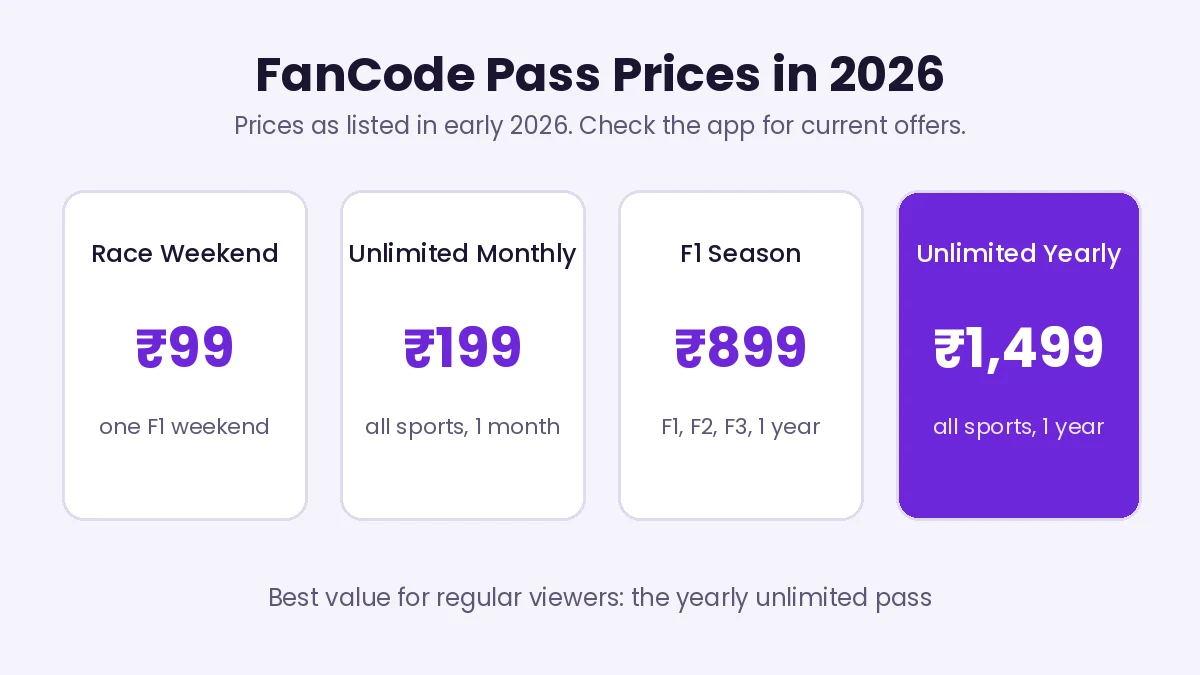
FanCode pass prices as listed in early 2026
As per prices listed in early 2026, a single F1 race weekend pass costs ₹99. The F1 season pass costs ₹899 for a year and covers F1, F2, F3 and F1 Academy with full race replays. If you also want MotoGP, a motorsports pass costs ₹999 a year.
If you watch many different sports, the unlimited livestream pass is the better choice. It costs ₹199 for one month or ₹1,499 for one year and covers all sports streamed on FanCode. Apart from these, the app often sells individual match passes and tour passes for specific cricket series, which are handy if you only want one series.
Prices and offers do change from time to time, and new users sometimes get a discount on the first purchase. So always check the latest price inside the app before paying.
Is FanCode Free?
This is a very common question. The honest answer is partly yes and mostly no.
Live scores, ball by ball commentary, match stats, news and many highlight clips are free on the FanCode app. You can follow a match closely without paying anything. But to watch live streams of most matches, you need to buy a pass or subscription.
In the past, some telecom and broadband plans have also included a FanCode subscription as a bundled benefit. If you are planning to change your mobile or home internet plan, check whether any current plan offers FanCode. It can save you the separate subscription cost.
One word of caution. You will see websites and Telegram channels claiming to show FanCode matches free. These are pirated streams. They are illegal, full of risky pop ups, and can push malware onto your phone. It is safer and more reliable to pay for a pass on the official app.
How to Download and Sign Up on the FanCode App
Getting started with the FanCode app is quick. It takes just a few minutes on your phone.
Step 1: Install the App
Open the Google Play Store on Android or the App Store on iPhone and search for FanCode. Check that the developer is the official one before installing. The app has more than 10 million downloads on the Play Store, so the real one is easy to spot.
Step 2: Create Your Account
Open the app and sign up with your mobile number or email. You will get an OTP to verify. Once verified, you can set your favourite sports and teams so the home screen shows matches you care about.
Step 3: Choose a Pass
Go to the match or sport you want to watch and tap on the subscribe or buy option. You will see the passes available for that match, tour or sport. Pick the one that suits you.
Step 4: Pay and Start Watching
Pay using UPI, a debit or credit card, or net banking. Once the payment goes through, the live stream starts working right away. Keep the payment confirmation message safely in case you ever need to contact support.
How to Watch FanCode on Your Smart TV
Watching sports on a small phone screen is fine on the bus, but nothing beats the big screen for a final over or a last lap. The FanCode app works on most smart TVs and streaming devices.
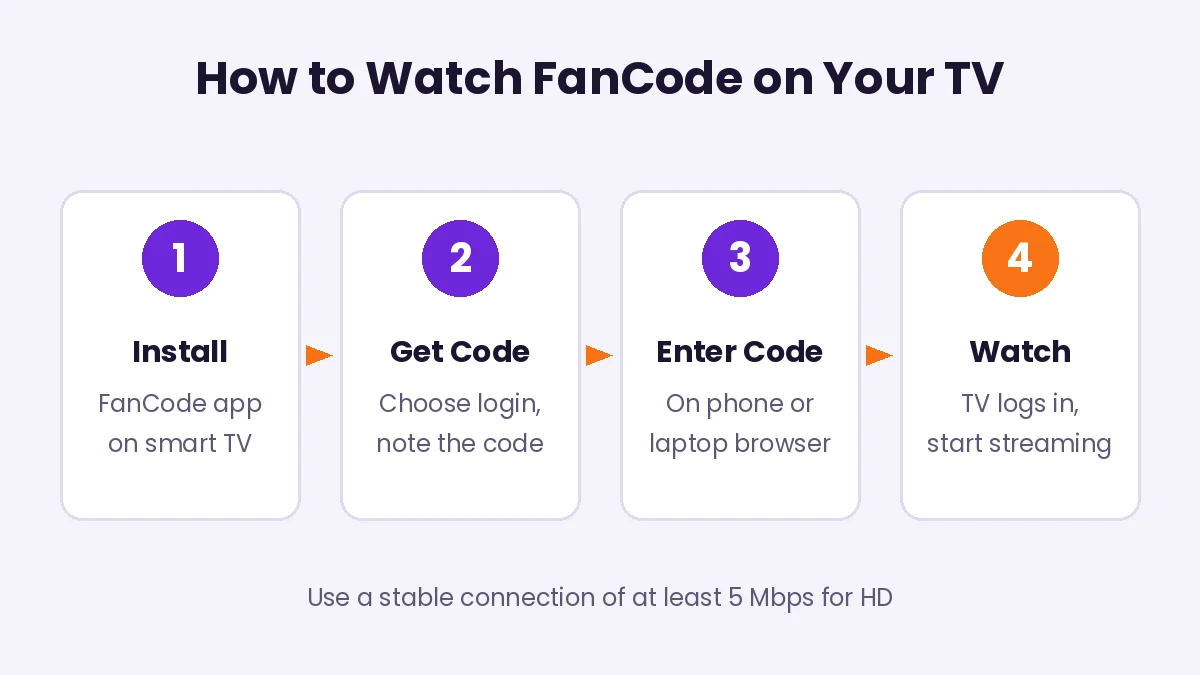
Four simple steps to log in to FanCode on your TV
It is supported on Android TV, Samsung Tizen TVs, LG webOS TVs, Fire TV Stick, Chromecast, Roku and Apple TV. Here is how to log in on your TV.
Install the FanCode app on your TV from its app store and open it. Select the login option. A unique activation code will appear on the TV screen. Now, on your phone or laptop, open the FanCode TV login page in a browser and enter that code. Sign in with the same mobile number or email you used to buy your pass. Your TV will log in automatically, and you can start watching.
If your TV does not have the app, you can use a Fire TV Stick or Chromecast, or simply cast the stream from your phone to the TV.
Tips for Smooth FanCode Streaming
Nothing is more frustrating than a FanCode app stream that keeps buffering during a key moment. These simple tips help a lot.
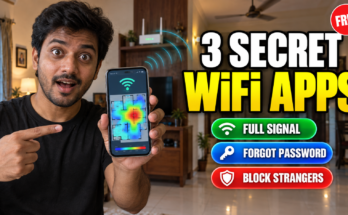
Use a stable internet connection of at least 5 Mbps for HD quality. If your WiFi signal is weak near the TV, the stream will keep dropping. Our guide on the best WiFi apps to check signal, password and connected devices can help you find the weak spots in your house and fix them.
Close other apps and downloads running on the same network during a big match. A phone downloading a large update in the next room can slow your stream.
Keep the FanCode app and your TV software updated. Updates often fix bugs and improve playback.
If you are on mobile data, lower the video quality in the app settings. HD streaming can eat a lot of data in a three hour match, so keep an eye on your daily data limit.
Log in a few minutes before the match starts. If there is any payment or login issue, you will have time to fix it without missing the first ball.
How to Save Money on the FanCode App
Sports passes are not very costly, but small amounts add up over a year. A little planning helps you get the most out of every rupee you spend on the FanCode app.
First, decide what you really watch. If you only follow one cricket series, a tour pass is cheaper than a full subscription. If you follow cricket, football and F1 all year, the yearly unlimited pass is far better value than buying monthly passes again and again.
Second, look for first time and festival offers. New users sometimes get a discount on the first purchase, and the app runs offers around big tournaments. Check the offers section inside the FanCode app before you pay.
Third, check your mobile and broadband plan. Some plans have bundled a FanCode subscription in the past, so compare plans when your current one is due for renewal.
Finally, share the TV with the family instead of everyone watching separately on their own phones. One pass on the big screen is cheaper, and honestly, watching a close finish together is much more fun.
FanCode App Features You Should Know
Apart from live streaming, the FanCode app has a few useful features that many users don’t explore.
On the FanCode app, live scores and ball by ball commentary update very fast, which is great when you can’t watch the full stream at office or college. You can also see detailed stats, like player form, head to head records and match summaries.
The app lets you follow your favourite teams and players so their matches show up first on your home screen. You can also turn on notifications for match start times and key moments, so you never forget a game.
Highlights and replays are available after many matches. If a match happens late at night, you can catch the key moments the next morning in a few minutes.
Is the FanCode App Worth It?
Whether the FanCode app is worth paying for depends on what you watch.
If you follow F1, it is the official way to watch in India, so the choice is simple. The season pass gives you every race and every session for a full year.
If you follow cricket closely, especially overseas series and leagues that are not on regular TV, the tour passes are good value. You pay only for the series you care about.
If you watch many different sports through the year, the yearly unlimited pass works out cheapest. At ₹1,499 a year, it comes to roughly ₹125 a month for all sports on the app.
If you only watch the very biggest cricket tournaments, check first whether they are actually on FanCode. Some big events are shown on other platforms, so make sure before you pay.
FanCode for Families and Kids
Many families now watch sports together on the TV through apps like FanCode. It is a great way to spend time together on weekends. But if your children also use phones and tablets, it is a good idea to keep an eye on screen time and app purchases.
Make sure the payment method saved in the app needs a PIN or confirmation, so kids don’t accidentally buy passes. If you want more control over what your child does on their phone, our guide on the FlashGet Kids parental control app explains how to set limits easily.
Common Problems and Simple Fixes
If the stream does not start after payment, close the app fully and open it again. If it still does not work, log out and log back in with the same number you used to pay.
If the video keeps buffering, check your internet speed and lower the quality setting. Restarting your WiFi router also helps more often than you would think.
If you were charged but the pass is not showing, wait a few minutes, as some payments take time to confirm. If it still does not appear, contact FanCode support from inside the app and share your payment reference number.
If the TV login code does not work, make sure you are entering it quickly, as these codes expire after some time. Generate a fresh code and try again.
The FanCode app has quietly become one of the most useful apps for any sports fan in India. Whether you follow overseas cricket, Formula 1, Asian football or something less mainstream, there is a good chance you will find it here. And with flexible passes, you only pay for what you actually watch.
Start by downloading the app and following your favourite teams for free. When a match you really want to see comes up, pick the pass that fits, set up the TV app once, and enjoy the game on the big screen with your family.
If you liked this guide, you may also enjoy our post on Instagram chat wallpaper for a fun way to customise your chats. And tell us in the comments which sport you watch most on FanCode.