Every month you walk into the mobile shop near your house, hand over ₹299 or ₹349, and get your recharge done. The shop owner taps a few times on his phone and says, “Done, message vandhuchu.” Have you ever wondered what he gets out of it? He is not doing it as a favour. Every recharge he does through his app earns him a small commission. With a good recharge commission app, you can do the same thing yourself and keep that commission for your own family.
In this guide, I will explain how shop owners actually earn on recharges, how a recharge commission app works, how much you can realistically earn, and how to get started with an app like Bill Yatra. I will also cover a few trusted alternatives, simple money safety tips and the tax side of commission income, so you can decide with full clarity and not get carried away by big promises.
How Shop Owners Earn Money on Your Recharge
When you pay ₹299 at a shop, the shop owner does not pay the full ₹299 from his pocket. He uses a retailer or agent app, basically a recharge commission app, that gives him a margin on every recharge. If the margin is 3 percent, the operator effectively charges him about ₹290, and he keeps around ₹9. That small amount is his income for that one recharge.
One recharge earns very little. But a busy shop does dozens of recharges every day, along with DTH recharges, electricity bill payments and FASTag top ups. All those small margins add up to a decent side income by the end of the month. On top of this, the customer who walks in for a recharge often buys a charger, a screen guard or a packet of biscuits too.
Here is the important part. There is no special licence needed to use many of these apps. Anyone with a smartphone and a bank account can sign up, add money and start recharging. That is the whole idea behind a recharge commission app.
What Is a Recharge Commission App?
A recharge commission app is an app that lets you do mobile and DTH recharges and pays you a small percentage of each recharge as commission or cashback. The money usually comes back into the app wallet, and you can use it for your next recharge.
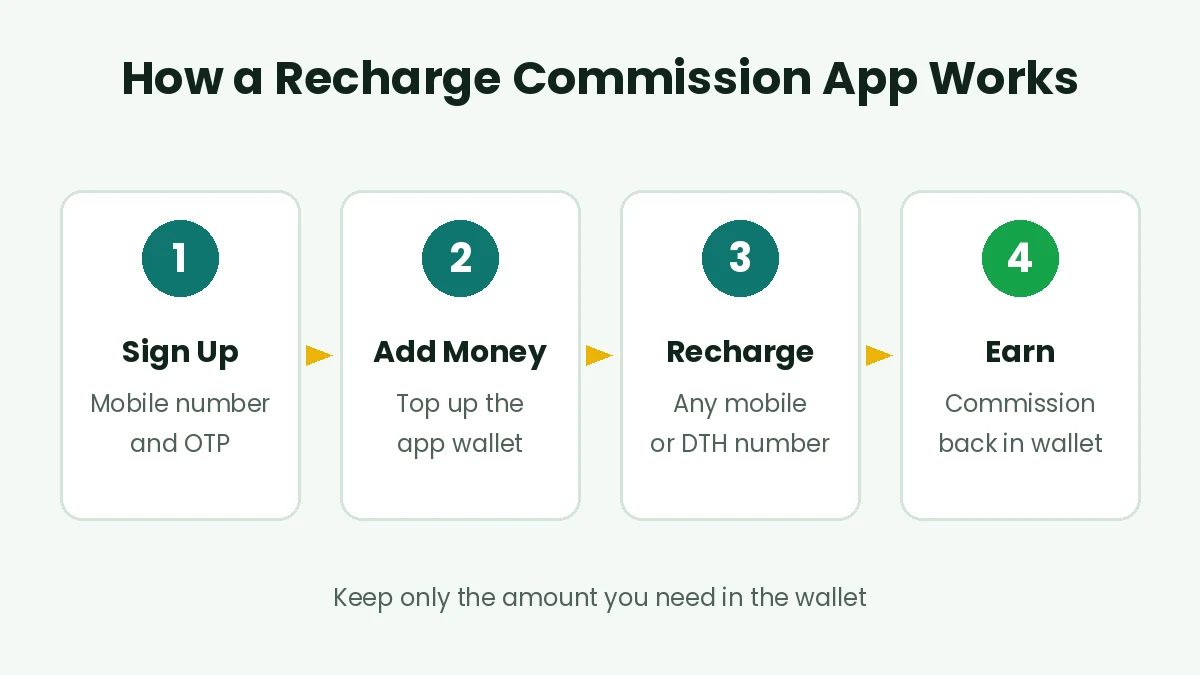
Sign up, add money, recharge and get commission back in the wallet
Almost every recharge commission app works in a similar way. You sign up with your mobile number and OTP. You add money to the app wallet using UPI, a debit card or net banking. Then you recharge any prepaid mobile or DTH number from that wallet balance. Once the recharge is successful, your commission is credited to the wallet.
There are two kinds of people who use a recharge commission app. The first is the shop owner, who does recharges for customers all day. The second is a normal family or a person who simply wants to earn a little back on the recharges they are anyway doing every month for their own phones, their parents’ phones and the home DTH.
How Much Commission Can You Really Earn?
This is where many videos and posts online go wrong, so let’s be very clear. The money from a recharge commission app is a small percentage, not a big amount. In most cases it falls somewhere between 2 and 4 percent, depending on the app, the operator and any running offers.
For example, Jio’s own JioPOS Lite page says it gives a 2 percent base margin on mobile recharges, plus a 2 percent introductory bonus that it is currently offering. That adds up to 4 percent. Other apps may give more or less, and rates for Airtel, Vi, BSNL and DTH operators can all be different.
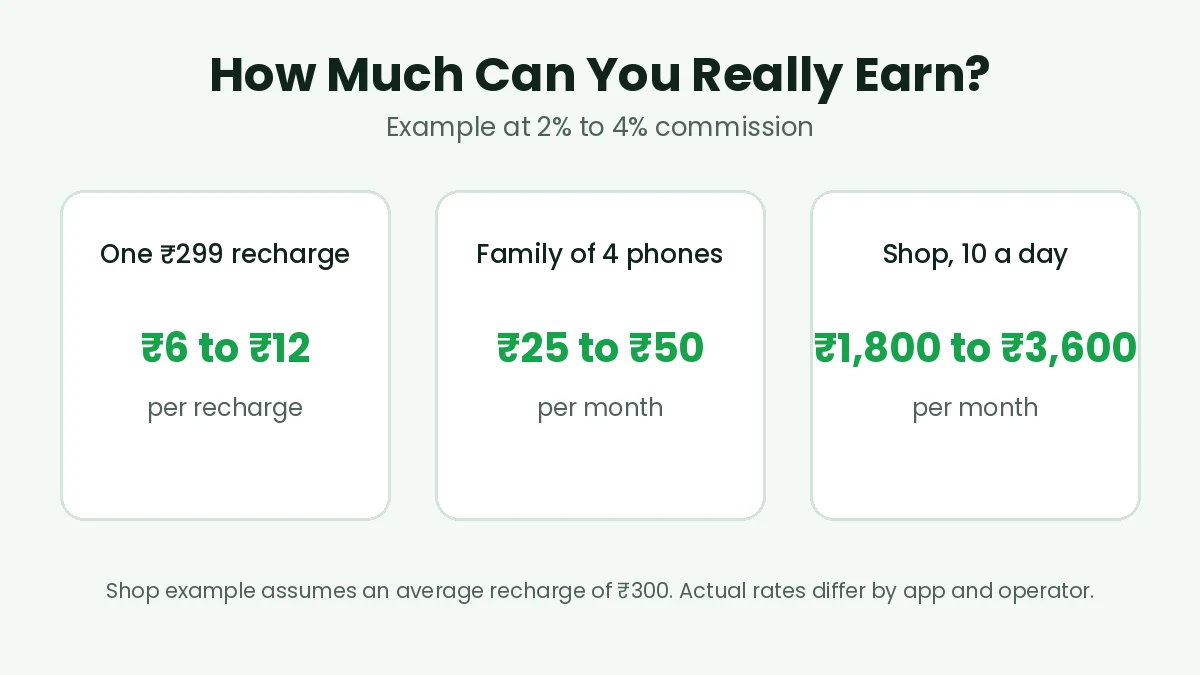
Realistic commission at 2 to 4 percent for personal and shop use
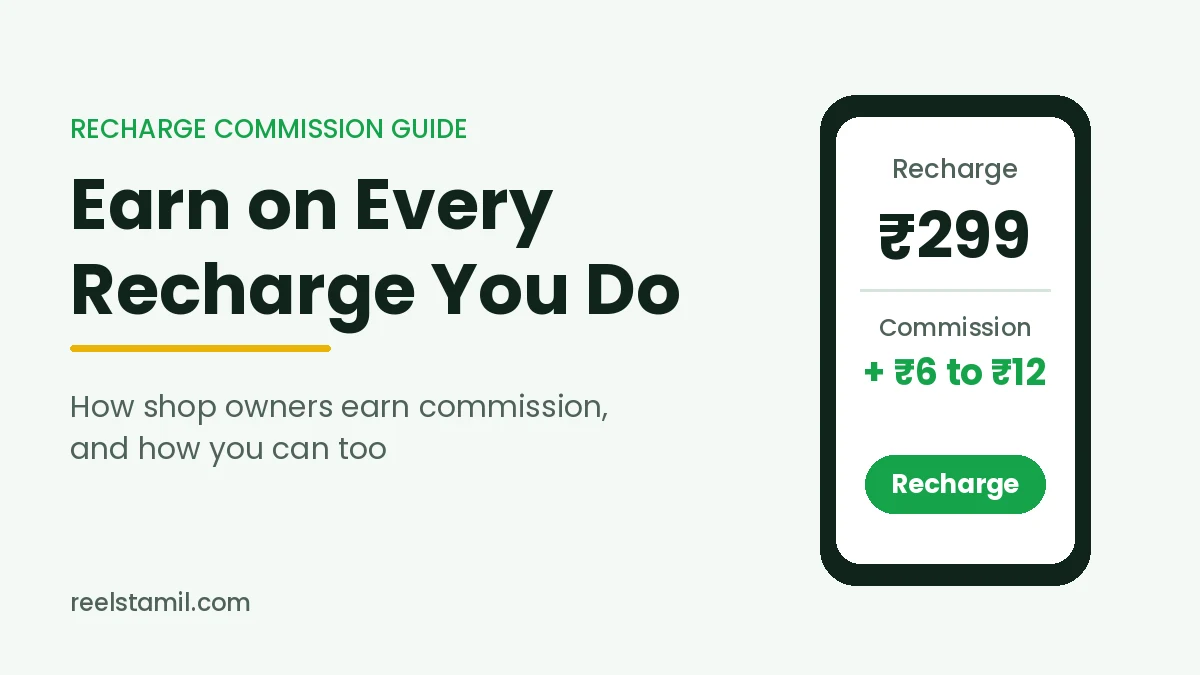
So on a ₹299 recharge, you can expect roughly ₹6 to ₹12. If you recharge four phones at home every month, that comes to around ₹25 to ₹50 a month. It is not huge, but it is money you were giving away to someone else until now.
For a shop owner, the numbers look better because of volume. If a shop does 10 recharges a day with an average value of ₹300, that is about ₹90,000 worth of recharges in a month. At 2 to 4 percent, the shop earns roughly ₹1,800 to ₹3,600 a month from recharges alone. If anyone tells you that a ₹300 recharge will earn you ₹50 or ₹100 in commission, be careful. That is not how it works.
Bill Yatra Recharge App: What It Offers
Bill Yatra is a recharge commission app available on the Google Play Store, and it is the one we are looking at closely in this post. As per its listing, it is run by Payearns Innovations (OPC) Private Limited, a company based in Assam. The app is aimed at retailers and agents, but anyone can sign up and use it.
Services Covered
Bill Yatra supports prepaid mobile recharges for Jio, Airtel, Vi and BSNL, including BSNL top up and validity. For DTH, it lists Sun Direct, Dish TV, Tata Play, Videocon D2H and Airtel Digital TV. That covers most of the operators used in Tamil Nadu homes.
Main Features
The app says it has zero joining fee, so you don’t need to pay anything to start. It promises commission on every mobile and DTH recharge, instant refunds for failed transactions, a refer and earn option, and live chat support. Its website mentions cashback of up to 5 percent on recharges. The exact rate you get for each operator is shown inside the app, so check it there before you recharge.
Things to Keep in Mind
As a recharge commission app, Bill Yatra is still very new. At the time of writing, it has only around 50 downloads and a handful of reviews on the Play Store. Most reviews are positive about the support team, but at least one recent user has asked where the money in their wallet went. New apps can be genuine and still have teething problems, so start small. Add only a little money first, do a couple of recharges, check that the commission and refunds actually work, and only then use it regularly.
How to Start Using Bill Yatra Step by Step
Getting started takes just a few minutes. Keep your phone and UPI app ready.
Step 1: Install the App
Open the Google Play Store and search for Bill Yatra Recharge App, or use the button near the end of this post. Check the developer name, Payearns Innovations, before installing, so you don’t download a look alike app by mistake.
Step 2: Sign Up With Your Mobile Number
Open the app and enter your mobile number. You will get an OTP to verify it. If a friend has shared a refer code with you, you can enter it at this stage. Never share this OTP with anyone who calls you claiming to be from the app.
Step 3: Add a Small Amount to the Wallet
Go to the wallet section and add money using the payment options shown. For your first time, add only what you need for one or two recharges. You can always add more later once you are comfortable.
Step 4: Recharge and Check Your Commission
Choose mobile or DTH, enter the number, select the operator and pick a plan. After the recharge is successful, check your wallet to see how much commission was credited. Also confirm on the phone that was recharged that the plan is active.
Step 5: Keep a Simple Record
Take a screenshot of each transaction for the first few weeks. If any recharge fails or a refund does not come, these screenshots make it much easier to raise a complaint with support.
Other Recharge Commission App Options Worth Knowing
Bill Yatra is not the only recharge commission app out there. Before you decide, it is worth knowing about a few other options, some of which come from much bigger and older companies.
JioPOS Lite
JioPOS Lite is Jio’s own app for people who want to do Jio recharges for others and earn a margin. As mentioned earlier, Jio’s page talks about a 2 percent base margin plus a 2 percent introductory bonus at present. The catch is that it is meant for Jio recharges. If most phones in your family or your customers use Jio, this is a strong, trusted option to look at.
Spice Money and PayNearby
Spice Money and PayNearby are large agent networks used by many small shops across India. Apart from mobile and DTH recharges, they let agents accept electricity, water, gas and broadband bill payments through the Bharat Bill Payment System, and also things like FASTag recharge, LIC premium payments and loan EMI repayments. These are better suited to shop owners who want to offer many services at one counter. You will usually need to register as an agent and complete KYC.
Regular UPI Apps
Apps like Google Pay, PhonePe and Paytm let you recharge easily, and sometimes give scratch cards or cashback offers. But these are occasional rewards, not a fixed commission. For steady earnings on every recharge, a proper recharge commission app works better.
Keep Your Money Safe: Wallet and Payment Safety Tips
Any recharge commission app that asks you to keep money in a wallet needs a little care. These simple habits protect you from most problems.
Keep only what you need in the wallet. If you do five recharges a week, there is no reason to keep ₹5,000 sitting in an app wallet. Add money as and when required.
Prefer well known apps for large amounts. A new app may be perfectly fine, but bigger and older platforms have a longer track record. You can use a newer app for small amounts and test it over time.
Read the refund policy before you start. Check how failed recharges are refunded and whether wallet balance can be withdrawn back to your bank account. Some apps only let you use the balance for more recharges.
Never share your UPI PIN or OTP. No genuine support team will ask for your UPI PIN, card PIN or OTP over a call or chat. If someone does, it is a fraud attempt. If you want to understand how UPI payments work in the background, the UPI page on Wikipedia explains it in simple terms.
Beware of “double your money” offers. If any recharge app promises to double your wallet balance, or asks you to bring in more people before you can withdraw, stay away. That is a scheme, not a recharge business.
Smart Ways to Save on Your Own Recharges
Earning commission is good, but spending less on recharges is even better. A few small changes can save more than the commission itself.
Look at long validity plans. A yearly or 84 day plan often works out cheaper per day than a 28 day plan. If you can afford to pay a larger amount once, compare the per day cost before choosing.
Check what you actually use. Many people pay for 2GB a day when they hardly use 1GB, because they are on home WiFi most of the time. If your home internet is slow in some rooms, our guide on the best WiFi apps to check signal, password and connected devices can help you use your home connection better and depend less on mobile data.
Avoid paying for extras you don’t watch. On DTH, remove channel packs that nobody at home watches anymore. Even ₹50 a month saved is ₹600 a year.
Recharge for the whole family together. If you use a recharge commission app, doing all the family recharges from one place means you earn commission on every one of them, and you can also keep track of when each number’s plan ends.
Common Mistakes to Avoid With a Recharge Commission App
The first mistake is believing every big claim. Commission is usually a few percent. If someone promises ₹50 on a ₹300 recharge, ask for proof before trusting them.
The second mistake is adding a big amount to a new app on day one. Test any new recharge commission app with small amounts first, check refunds, and grow slowly.
The third mistake is installing apps from links shared on WhatsApp. Always download from the official Play Store and check the developer name. Fake apps with similar names do exist.
The fourth mistake is ignoring failed recharges. If money is deducted but the recharge does not happen, raise it with support immediately and keep the screenshot. Most apps refund within a short time, but you need to follow up.
The fifth mistake is mixing shop money and personal money. It becomes very hard to know whether you are actually earning anything. Keep it separate from the start.
The shop owner near your house has been earning a small commission on every recharge you do. With a recharge commission app, you can keep that money yourself, whether you are recharging four phones at home or running a busy counter at your shop.
Just keep your expectations real. The commission is a few percent, not a jackpot. Start small with an app like Bill Yatra, compare it with trusted options like JioPOS Lite, keep only what you need in the wallet, and never share your PIN or OTP. Done this way, it is a simple, safe way to earn a little back every month.
If you liked this post, you may also enjoy our guide on checking if your gold is original using the BIS CARE app, and our honest look at the Jio tower rooftop rent offers. And if you try any recharge commission app, tell us in the comments how much you earned in your first month.